The interface
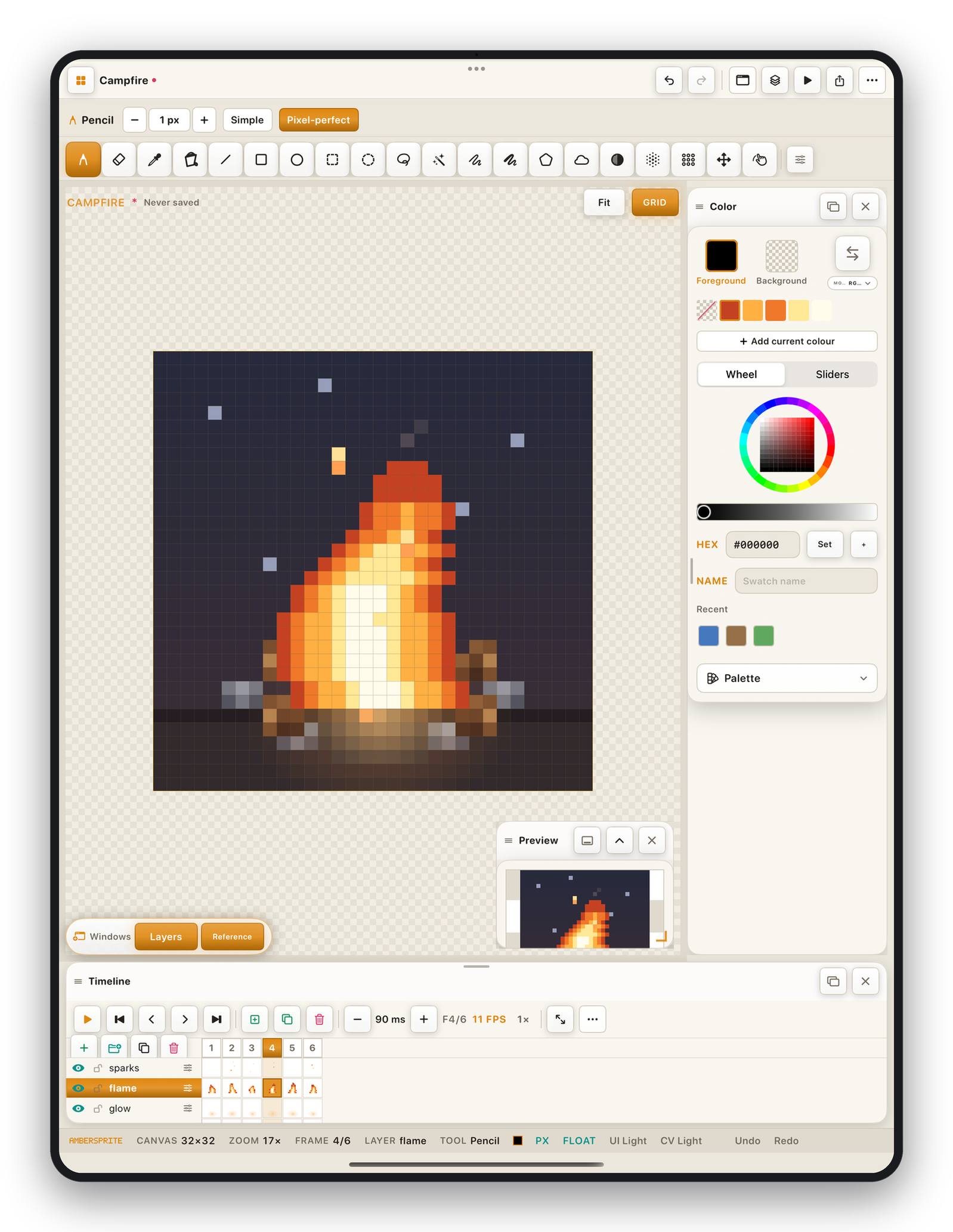
The regions#
| Region | What it does |
|---|---|
| Top bar | Gallery, document name, undo / redo, panel toggles, play, export, and the ⋯ overflow menu that carries the full command tree (File, Edit, Sprite, Layer, Frame, Select, View, Help). |
| Context bar | Options for the current tool only — brush size, ink mode, pixel-perfect, fill scope, shape fill, and so on. It changes as you switch tools. |
| Tool rail | Every drawing tool, plus expandable sections for brush tip, symmetry, grid, onion skin and pencil dynamics. Docks on the left or top (Settings ▸ Appearance ▸ Tool bar position). |
| Canvas | Your artwork. Pinch to zoom, two-finger drag to pan. |
| Colour panel | Foreground / background swatches, palette grid, wheel or sliders, hex field, and the Palette menu. |
| Layers panel / timeline | The layers × frames grid. The left column is the layer list; each cell is a cel. |
| Preview panel | A live, independent view of the sprite with its own zoom — useful while you work zoomed in. |
| Status bar | Cursor position, canvas size, zoom, active frame and layer, current tool, and the theme names. |
Panels#
Every panel can be docked (attached to an edge) or floating (dragged anywhere). Drag a panel's header to detach it; drop it near an edge to re-dock. Close a panel with its ✕; bring it back from the windows menu (the macwindow icon in the top bar) or View ▸ Workspaces.
See Panels & workspaces for layout presets and saved layouts.
Menus#
The ⋯ overflow menu in the top bar contains:
- **File*— New, Open, Save, Save As, Import (image, reference, sprite sheet, palette), Export, Share.
- **Edit*— Cut / Copy / Paste, flip, rotate, scale, skew, outline, replace colour, invert, grayscale, capture brush, harvest palette, keyboard shortcuts, scripts.
- **Sprite*— Properties (canvas size), colour mode, duplicate, rotate / flip canvas, crop, trim, histogram, brush library, version snapshots.
- **Layer*— New, group, duplicate, delete, from selection, reorder, merge, flatten, convert to background, clipping mask, tilemap.
- **Frame*— New, empty, delete, reverse, reorder, copy / paste cel, tags.
- **Select*— All, deselect, reselect, inverse, opaque, cel bounds, expand / contract / border, save / load mask, add slice.
- **View*— Fit, grid & guide options, tool bar position, workspace presets.
- **Help*— this manual, What's New, replay the intro.
Focus mode#
A four-finger tap on the canvas hides all chrome for a distraction-free full-screen view. Tap the exit pill (top-left) or four-finger tap again to leave.